Currently reading: Top 10 (Web Safe) Blogging Fonts

The definition of Web Safe fonts means that they are generic fonts that work throughout (most) Web Browsers and are used on all operating systems (Windows, Linux and Mac). So if you design web pages on any of these sytems or use any browser then they will be displayed the exact same. Of course, nothing is as easy as saying that Comic Sans works across all, the reality is, with Safari, that Bold doesn’t display well. So we have to play it safe, we have a very small range of fonts to use, so we have to be creative with what we have.
Below are a list of the most commonly used fonts for Blogging and Web Design.

You can also download Web Safe fonts here.

Georgia Font
(CSS) Font-Family: “Georgia”, serif
Designed in 1993 by Matthew Carter for the Windows…read more on Wikipedia.

Arial Font
(CSS) Font-Family: “Arial”, Helvetica, sans-serif
The typeface was designed in 1982 by Robin Nicholas…read more on Wikipedia.

Courier New Font
(CSS) Font-Family: “Courier New”, Courier, monospace
The typeface was designed by Howard “Bud” Kettler in 1955…read more on Wikipedia.

Trebuchet Font
(CSS) Font-Family: “Trebuchet MS”, Helvetica, sans-serif
Designed by Vincent Connare for the Microsoft in 1996…read more on Wikipedia.

Lucida Console Font
(CSS) Font-Family: “Lucida Console”, Monaco, monospace
Designed by Charles Bigelow and Kris Holmes in 1985…read more on Wikipedia.

Verdana Font
(CSS) Font-Family: “Verdana”, Geneva, sans-serif
Designed by Matthew Carter for Microsoft…read more on Wikipedia.

Times New Roman Font
(CSS) Font-Family: “Times New Roman”, Times, serif
Designed by Stanley Morison in 1931…read more on Wikipedia.

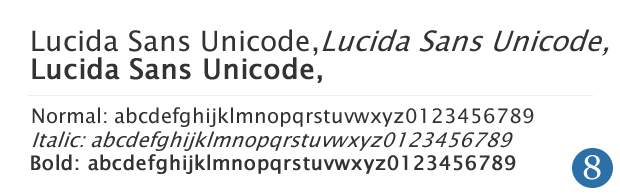
Lucida Unicode Font
(CSS) Font-Family: “Lucida Sans Unicode”, Lucida Grande, sans-serif
It was developed by Charles Bigelow & Kris Holmes in 1993…read more on Wikipedia.

Tahoma Font
(CSS) Font-Family: “Tahoma”, Geneva, sans-serif
Designed by Matthew Carter for the Microsoft Corporation in 1994…read more on Wikipedia.

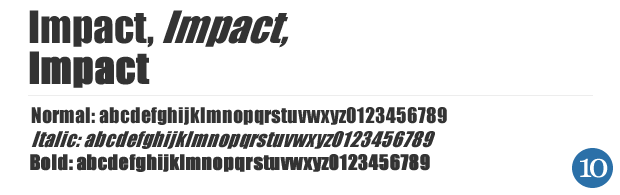
Impact Font
(CSS) Font-Family: “Impact”, Charcoal, sans-serif
designed by Geoffrey Lee in 1965…read more on Wikipedia.

Read more articles from the Fonts blog topic.
To stay up to date with this article and subscribe to our RSS 2.0 feed. You can also trackback from your own site.
Social Bookmarks: | Blogmarks | del.icio.us | Digg it | Furl | reddit | Spurl | StumbleUpon

Comments

Name (required)

Email (required)

Website

Write your comment below.

29 Comments so far

  1. CostCaptain on January 12, 2008 8:13 pm

    It is so challenging to find the correct font to match the theme of your site. Steve Jobs of Apple.com took calligraphy in college which helped him design the first Mac. You really need an eye for design and it makes all the difference in the world.

  2. Rapidshare Bloggers on January 12, 2008 11:51 pm

    Sweeeet list

  3. Carlos Eduardo on January 30, 2008 5:03 am

    Great List!

    It will help many Web Designers that already have questions about wich fonts can they use on their works…

    I like the CSS rule for each font too.

    Thanx!

  4. Ron S on February 2, 2008 4:37 pm

    It’s no question that the above 10 fonts are safe for use on the web, but most will agree that using Impact and Courier is a rather bad idea, for usability and aesthetic purposes.

  5. apple pie recipe on February 4, 2008 8:21 pm

    I never knew some of these fonts were as old or as new as they are.

  6. David Jacques-Louis on February 8, 2008 11:39 am

    Interesting reading

  7. Amber-Lee on February 12, 2008 1:12 pm

    I’ve found that it is important to take a look at the display of your site with each of the fonts. For instance, if you use this rule:Font-Family: “Trebuchet MS”, Helvetica, sans-serif; test it with the Helvetica alone. That way if for some reason the user doesn’t have “Trebuchet” there won’t be any surprises on what your lay out looks like. Heck, I’ve even tested with “serif”.

  8. Not Web-safe on February 20, 2008 10:19 pm

    Most of these fonts are “web-safe” for Windows, and only for Windows. They are shaky, at best, with other systems.

  9. Stephen on February 21, 2008 8:59 am

    To be fair, I think the point of the article is to suggest CSS rules which are web-safe, rather than fonts per se.

    Each one has a Mac font similar to the Windows one (e.g. Geneva for Tahoma).

    Not rocket science, but a handy list.

  10. kayol on March 6, 2008 4:44 pm

    Stumble! Found this post through our web hosting website. Correct font and theme to match can be very trying when it comes to blogging.

  11. Stephanie on May 8, 2008 4:33 pm

    Thanks this is just what I was looking for.

  12. Jack on May 16, 2008 8:46 pm

    Nice List, Thanks Again.

  13. Movie Goers on June 18, 2008 3:24 pm

    Thanks for the download link for the fonts =)

  14. ремонт офисов on August 4, 2008 6:42 am

    Круто. Так и продолжай.

Related Articles