---
title: "Coding a Vimeo API Instant Search App with jQuery"
id: "29181"
type: "post"
slug: "coding-a-vimeo-api-instant-search-app-with-jquery"
published_at: "2012-10-31T07:29:56+00:00"
modified_at: "2024-05-16T12:27:24+00:00"
url: "https://speckyboy.com/coding-a-vimeo-api-instant-search-app-with-jquery/"
markdown_url: "https://speckyboy.com/coding-a-vimeo-api-instant-search-app-with-jquery.md"
excerpt: "In this tutorial, we show you how to build a small Vimeo API instant search web app, creating the front-end with jQuery and the backend on PHP."
taxonomy_category:
- "JavaScript"
taxonomy_post_tag:
- "API"
- "Code Snippet"
- "JavaScript Plugins"
- "jQuery"
---
# Coding a Vimeo API Instant Search App with jQuery
Last Update: May 16, 2024
By Jake Rocheleau
[JavaScript](https://speckyboy.com/category/javascript/)
Web developers and Internet enthusiasts alike are very fond of online video services. One social video website Vimeo is a great example of how HD content can be stored and streamed across the planet. I love the quality you find with Vimeo uploads, and the user base is extremely knowledgeable on a wide variety of topics.
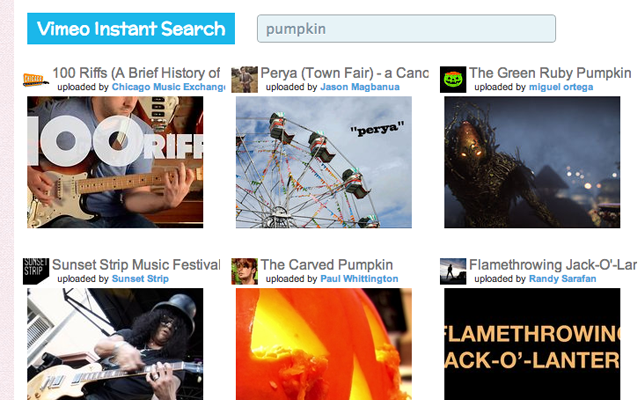
For this tutorial, I want to explain how we can build a small Vimeo API instant search web app. I’ll be creating the front end with jQuery and the back end with PHP. There is actually a full developer’s API with references for programmers. I’ll stick to explaining the more convoluted ideas so that you can follow along with my source code.
## Initial Document Concept
I will first explain how we can put together the HTML document so it runs our frontend Ajax functions. Let’s include a reference to the most recent jQuery library, which is used for Ajax calls. I’m also using another file v.js, for our custom API commands.
Inside the body, I have an input field used for search queries. The `#results` div will contain all the HTML output directly into our webpage. The whole index document is actually very small in comparison to the scripts. I’ve copied over the exact code below:
```
Vimeo Instant Search
Vimeo Instant Search
```
Inside the results `div` we will include smaller divs with video content. This would make reference to the video title, thumbnail image, and the uploader’s name. The CSS styles are super easy to follow and read quickly. I have also included a few CSS resets and these other blocks added into my `style.css` file.
```
/** results **/
#results { display: block; }
#results .v { display: block; float: left; position: relative; width: 225px; margin-right: 12px; margin-bottom: 22px; padding-bottom: 10px; }
#results .v a.wrapping { display: block; width: 225px; }
#results .v .details { display: block; }
#results .v .details img.userpic { float: left; position: relative; padding: 2px; background: #fff; top: -2px; left: -7px; }
#results .v .details h3 { display: block; position: relative; font-size: 1.55em; white-space: nowrap; overflow: hidden; left: -6px; margin-bottom: 2px; color: #737373; }
#results .v .details .user { display: block; font-size: 1.1em; color: #333; left: -4px; white-space: nowrap; overflow: hidden; }
#results .v .details .user a { font-weight: bold; }
```
## Backend API Dev in PHP
Let’s jump now into the backend coding in PHP. Afterward, we can tie in both frontend and backend interfaces to make our Ajaxified web app. To start off, I’m going to download a copy of the [official Vimeo API wrapper](https://github.com/vimeo/vimeo-php-lib)
in PHP.
We can simply include this file in our backend PHP document, which I’ve named `ajax.php`. Any call we make on the backend will require an API public key and secret key. These are just long string hashes to authenticate your web app. Head over to Vimeo’s developer page and sign up for a new application. The process is quick and shouldn’t take more than a couple of minutes to complete.
Now, we can start building the custom PHP file for Ajax response data. We’re going to be passing JSON content because this is the easiest output to loop through inside jQuery. Here are the first couple of lines inside ajax.php:
```
header('Content-type: application/json');
require_once('vimeo.php');
$key = "PUBLICKEY";
$secret = "SECRETKEY";
$query = $_POST['q'];
$limit = 12; // number of videos to display for each search
```
The `header()` function is necessary to determine what type of output we’re providing. Also, the `$query` variable isn’t defined just yet, but we’ll be creating this inside JavaScript. It will contain the search string a user has entered into the form field.
```
$vimeo = new phpVimeo($key, $secret);
$response = $vimeo->call('vimeo.videos.search', array('per_page' => $limit, 'query' => $query, 'sort' => 'relevant'));
$jarray = array();
```
Now we’re getting into the more complex PHP logic cycle. `phpVimeo` is referencing the class file we included from Github. This makes data access a whole lot easier, and we can save hours of development time. The `$jarray` variable is simply an empty array for now. It will eventually contain data on 12 full videos from the search query, then get passed into JSON.
## Looping Through Return Data
With all the main PHP stuff setup, we can move into the return content. Since we are working with multiple results, this requires a foreach loop to quickly pass through all the related data. We will set up array keys inside the `$jarray` variable, which will be repeated for each new entry.
```
foreach($response->videos->video as $v){
$videoinfo = $vimeo->call('vimeo.videos.getInfo', array('video_id' => $v->id));
$jarray[] = array(
"thumbnail" => $videoinfo->video[0]->thumbnails->thumbnail[1]->_content,
"url" => $videoinfo->video[0]->urls->url[0]->_content,
"title" => $videoinfo->video[0]->title,
"username" => $videoinfo->video[0]->owner->display_name,
"userurl" => $videoinfo->video[0]->owner->profileurl,
"userpic" => $videoinfo->video[0]->owner->portraits->portrait[0]->_content
);
}
print_r(str_replace('\\/', '/', json_encode($jarray)));
die();
```
This code will work by pulling from our `>$response` data earlier. Each `$response->videos->video` object holds internal data which we need to pull out and save. This data specifically includes a video thumbnail, URL, and title, along with the uploader’s username, profile URL & photo.
The last `print_r()` function outputs all our data onto the page in JSON format. We need to remove escaped slashes from the output so it’s cleaner and easier to sort through. Then finally, the PHP script calls `die()` to let Ajax know we are done using the asynchronous connection.
## Custom jQuery Instant Search
So, with the front and backend complete, let’s tie everything together through JavaScript. I’m writing my code inside an external file, v.js which begins like any typical jQuery document.
```
$(document).ready(function(){
var s = $("#s"); // search input field
var c = $("#results"); // results container
var t; // timer
$("#s").keydown(function(e){
clearTimeout(t);
if (!args) { var args = []; }
if (e.which === 65 && (e.ctrlKey || e.metaKey)) {
// allow the user to ctrl+a or cmd+a to select text
// without calling a new search function
} else {
t = setTimeout(function(){ vimeoSearch() }, 400);
}
});
```
The first few variables are shorthand for targeting the input search field, results div, and a numerical timer. Since people can often take extra time when typing, we need to give a delay before calling the API search. This is the purpose of a timer variable coupled with the JavaScript `setTimeout()` method.
Targeting the search field, I have set up a new event listener for any `.keydown()` event. Each time the user enters a new key, we will clear the previous timer to start fresh and run a simple if/else clause. If the user has entered CTRL+A or CMD+A, then we do not run any search. This is associated with selecting all the text inside a search input and generally doesn’t constitute a new search query.
Otherwise, the user has entered some new text, and we’re pausing for 400 milliseconds, then calling a new function `vimeoSearch()`.
## Ajax Results Display
Inside my vimeoSearch() function, we are performing a couple of tasks. First, empty out the contents div in case there are still previous search results displaying. Then we create a variable for the query string and append a loader gif to the page while we await results.
```
function vimeoSearch() {
c.empty();
var q = s.val();
c.html('');
$.ajax({
type: 'POST',
url: 'ajax.php',
data: "q="+q,
success: function(data){
$.each(data, function(i, item) {
var code = '
';
$("#loader").remove();
c.append(code);
}); // end each loop
},
error: function(xhr, type, exception) {
c.html("Vimeo Error: " + type);
}}); // end ajax call
} // end vimeoSearch() function
```
The whole function looks really long, but there aren’t a lot of moving parts. The longest segment is inside the `.ajax()` method where we define some parameters and set up a success/failure callback function. If we access `ajax.php` and get a successful result, then we need to loop through each of the JSON values.
This can be accomplished through jQuery’s `.each()` loop placed on the return data. After generating the full code, we can remove the loader image and append all our new data. Otherwise, we display a parse error on the page for any failed search queries. Most of the code is fairly straightforward and should be easy enough to follow.

## Final Thoughts
I hope this tutorial is a good introduction to using Vimeo’s API. Backend web development is powerful and gaining more attention from mainstream programmers. With open APIs on nearly any website, it’s becoming even easier to build complex web applications right inside your browser.
If you are unfamiliar with PHP, then much of this code will seem foreign. But if you have the ability to scan each document, you may learn a few neat tricks. Additionally, you can download a copy of my source code and work with it on your own server. If you have any further comments or questions, feel free to post in the discussion area below.
## Related Articles
- [Building a Simple Reddit API Webapp Using jQuery](https://speckyboy.com/building-simple-reddit-api-webapp-using-jquery/) The growing number of 3rd party APIs has created a tremendous group of enthusiastic developers. But without time to research documentation, this leaves some people…
- [How to Resize Images in an Article or Post with jQuery](https://speckyboy.com/resize-images-in-a-post-with-jquery-and-turn-it-into-a-plugin/) If you own a blog, chances are you post pictures in your posts once in a while. Likewise, you have probably encountered the problem of…
- [Cut Your Page’s Loading Time In Half With Some Simple jQuery](https://speckyboy.com/your-page-speed-down-cut-your-pages-loading-time-in-half-with-some-simple-jquery/) It is a popular trend at the moment to use almost full-page high-resolution super-large images on your portfolio, which does work effectively as it focuses…
- [How to Create Amazing Page Effects with jQuery UI](https://speckyboy.com/utilizing-jquery-ui-animations-for-neat-page-effects/) If you're familiar with developing JavaScript, then you must know about jQuery. It's an extremely powerful library that allows you to write much simpler code…
- [How to Create a Basic jQuery Tooltip Plugin](https://speckyboy.com/how-to-create-a-basic-jquery-tool-tip-plugin/) If you have had anything to do with web development of late, you hardly need an introduction to either jQuery or jQuery plugins. In fact,…
## Related Topics
- [API](https://speckyboy.com/topic/api/)
- [Code Snippet](https://speckyboy.com/topic/code-snippet/)
- [JavaScript Plugins](https://speckyboy.com/topic/javascript-plugins/)
- [jQuery](https://speckyboy.com/topic/jquery/)
## Written by Jake Rocheleau
**Jake Rocheleau** is a passionate web designer and social media entrepreneur. He is frequently researching the latest trends in digital design and new-age Internet ideas. He's also an advocate for the social media revolution - follow his updates on Twitter @jakerocheleau.
[Read more articles by Jake Rocheleau](https://speckyboy.com/author/jakerocheleau/)
---
Top
This page may contain affiliate links. At no extra cost to you, we may earn a commission from any purchase via the links on our site. You can [read our Disclosure Policy](https://speckyboy.com/affiliate-disclosure/)
at any time.
 ');
$.ajax({
type: 'POST',
url: 'ajax.php',
data: "q="+q,
success: function(data){
$.each(data, function(i, item) {
var code = '