
This is the second part the website speed series where we closely look at the techniques employed to make a website run as fast as possible while still maintaining it’s stunning look and feel.
Images can make or break a website, whether that be adding a humanist feel to a site, adding animation and mouse over effects or finalizing that amazing design that just can’t be achieved with CSS alone. Yet all these images could cost the biggest price of any website, loss of visiting traffic. If a website takes too long to load or is unusable due to all of the images then it’s game over as the user will quickly go back to Google and search again.
There are however many techniques that you as a web designer can use to either reduce the number of images that are loaded or reduce the size of those images.
Before we get started, I’m not going to look at SWF as it does not work on the iPhone/iPod/iPad at this time or WebP as it is currently super-limited in browser support, or Silverlight as it needs an extra plugin installed….
So without further a-due, on with the list of techniques…
#1: Choose the right image type for the job
There are currently quite a few image formats that are used within web design: PNG8, PNG24, PNG32, JPG and GIF. These are widespread and supported by every browser, all are very different and are all suited for a particular use. Lets take a closer look at each.
GIF ~ *.gif
- Where to use: IE6 clients when you need transparencies, non-complex images with less than 256 colors and it can be animated.
- Limitations: Can only hold up to 256 colors in total.
- Pros: Their transparencies work on all browsers, the smallest size completely blank image (see CSS sprites further on), very easy to reduce the color depth to make smaller a file size and offers an animated format.
- Cons: Images often loose quality when in GIF format as the image creation package has to workout the closest color match. Not very good for photo’s. Animations can be massive in size if you are not careful. Images can appear jagged, and transparencies can sometimes have bleed on the edges.
JPG ~ *.jpg or *.jpeg
- Where to use: Perfect for photos or images where no transparency is needed, such as background gradients.
- Limitations: No transparencies, not very good with text.
- Pros: Excellent for photos, 24-bit color giving 16 million colors.
- Cons: JPGs are much larger when creating files with few colors in it, they have lots of extra info included in the file (Exif) such as camera, ISO and shutter speed, which are not needed on the web. No animation support.
PNG8 ~ *.png
- Where to use: Any browser with the exception of IE6 when needing transparencies.
- Limitations: Like GIF only has a maximum of 256 colors.
- Pros: Similar file size to GIF but with a sharper output. Transparencies work great. Excellent for CSS sprites when using only up to 256 colors and reduced color depth images.
- Cons: Not so handy with IE6 as you would need a separate PNG fix to make transparencies work, but that only applies to images with transparencies. Not very good for creating photo quality output. No animation support.
PNG24 ~ *.png
- Where to use: High quality images that do not require a transparencies.
- Limitations: No transparency support.
- Pros: 24 bit colors giving 16 million colors for very high quality images.
- Cons: No transparencies and often larger than JPG when used for photos.
PNG32 ~ *.png
- Where to use: High quality images, icons and colored based opacities.
- Limitation: None really when it comes to the web.
- Pros: 24-bit color and 8-bits to handle transparencies. Excellent for icons, gradients and other images. Easy to crush.
- Cons: Over sized KB’s when creating photo images.
Rule of thumb
So to round that up into a rule of thumb, use JPG for photo’s and gradients without transparencies, use GIF for IE6 transparencies, use PNG8 for all other browsers with low color depth images and transparencies and use PNG32 for the best quality and transparencies.
Of course you can use PNG with transparencies on IE6, but it will need the addition of a .htc file and possibly a Javascript file to make it work in all situations, or just a Javascript file depending on what version of the PNG fix that you use on your site to make it work, it will however slow down loading time.
#2: Use the right tools to create a web friendly image
Many designers and design studios use Photoshop and Illustrator to create their images, whether that be logos, gradients, icons or whatever. But these tools may be a great for creation, they are at times truly woeful for outputting images for the web.
Often images that come out of Photoshop are up to 50% larger in KB’s than are actually needed for the quality, and Illustrator is often not much better when talking about Jpgs. On top of that they don’t support Gif animations that some of your clients may desire. So instead of using the save for web options that come with Photoshop, just save it as a PSD and open it in Fireworks (or maybe Illustrator depending on the output medium) and export for the web from there.
Fireworks is the superior Adobe product for creating web ready images. OK, I am a mega bias Fireworks fan, so to prove the point to myself I’ve done a bunch of tests and have the results below. For me the most consistent performer is still Fireworks, especially when you look at Jpg, Illustrator is a far superior tool over Photoshop, with Photoshop being truly dire on nearly all file formats.
| Photoshop | Illustrator | Fireworks | |
|---|---|---|---|
| 1x1px transparent Gif | 1,101bytes | 43bytes | 43bytes |
| Sample Jpeg image(my cat Jack), orignal size 2848×2134 reduced to 800×599. Output at 80% quality | 124,206bytes pre-crushing
119,393bytes post-crushing |
119,599bytes pre-crushing
114,844bytes post-crushing |
51,838bytes pre-crushing
51,838bytes post-crushing |
| PNG8 output with transparencies with facebook icon | 3,456bytes pre-crushing
2,582 bytes post-crushing |
1,805bytes pre-crushing
1,738 bytes post-crushing |
1,762bytes pre-crushing
1,646bytes post-crushing |
| PNG32 output with transparencies with Facebook icon | 3,654bytes pre-crushing
2,798bytes post-crushing |
2,831bytes pre-crushing
2,760 bytes post-crushing |
2,882bytes pre-crushing
2,802bytes post-crushing |
| Animated Gif | Yep can do | Not Possible | Works perfectly |
Do feel free to complain that I did not use Gimp or any other software for this comparison, and if you wish do provide me with the results I will certainly add it to this table. All versions of the Adobe software were from the CS5 set, lets hope that CS6 will be even better.
#3: Learn how to output the lowest kb’s with highest quality
Firstly, it’s got to be said that there are no hard and fast rules for choosing the image that will give you the best output quality while still maintaining the lowest kb’s. It’s all about trial and error.
Ok, these are the rules of thumb mentioned before, that for example if your working with images that are above 256 colors forget about Gif and Png8, and for most photo’s Jpg’s are the best, for icons with transparencies Png32 will always kick butt, but for gradients without transparency then it will usually be Jpgs, for transparency it will be Png32, borders and lines tend to have transparent backgrounds so Gif, Png8 and Png32 are usually the best.
Lets take a closer look as some examples of where a wrong choice in the image format can cost 100’s of KB’s of size and maybe valuable seconds of loading time. Again, I am using Fireworks as the tool for creating all of these images due to it’s consistent results and then ImageOptim for crushing.
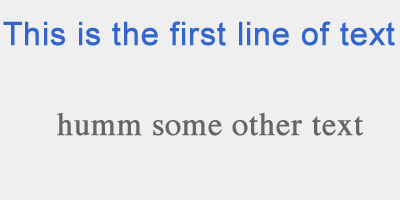
A text image with a low number of colors
This really simple (very un-artistically made) image is pretty damn ugly, but will give you a good idea of what I am trying to illustrate. It’s the kind of thing that is often used on a website to create a meaningful feel with text only.
| GIF | Jpeg | png8 | png24 | png32 | |
|---|---|---|---|---|---|
| Size in bytes after crushing | 4,210 bytes | 9,718 byte | 2,554 bytes | 2,385 bytes | 2,827 bytes |
As you can see, PNG24 wins out on this image (after crushing, PNG8 before crushing), with PNG8 coming a close second, at the other end of the scale JPG performs incredibly badly, not only in KB image size but also in picture quality. You can view a comparison page yourself to take a look at the output.
A photo image
Another take of that photo of Jack, this time re-sized to 400px wide and formatted into various different file types.

| GIF | Jpeg | png8 | png24 | png32 | |
|---|---|---|---|---|---|
| Size in bytes after crushing | 36,415 bytes |
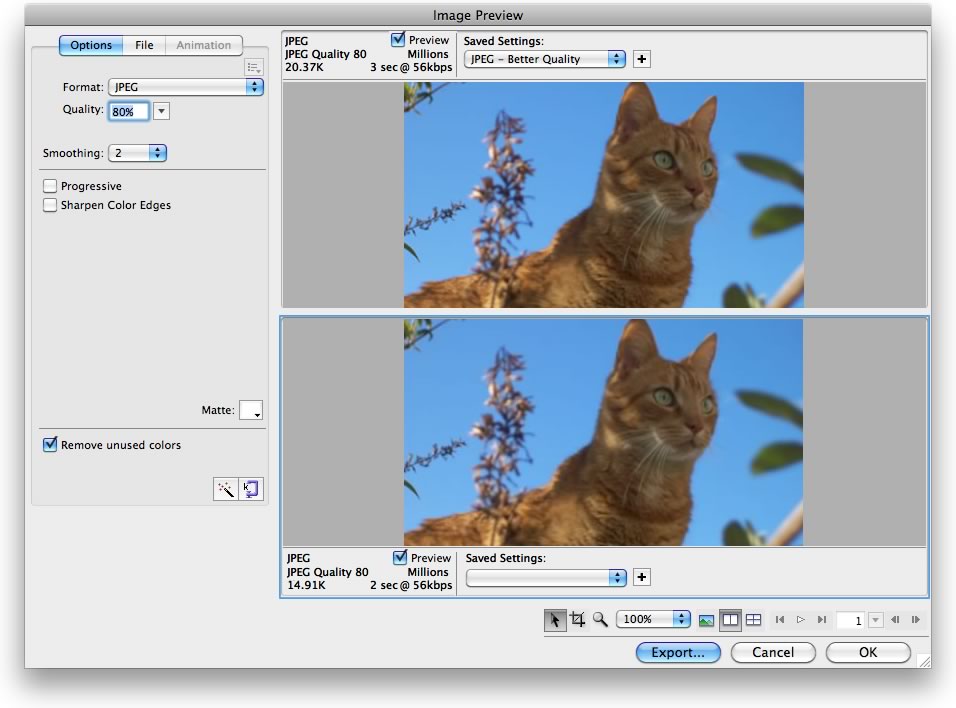
100% = 134,915 bytes 80% = 20,368 bytes 80% Smoothing 2 = 19,479 bytes 80% Smoothing 2 Sharpening off = 14,912 bytes |
29,904 bytes | 178,727 bytes | 179,044 bytes |
This time Jpg is the clear winner and when turning off the sharpening and setting the smoothing to 2, without any perceivable change to the image I was able to knock off many of those extra kb’s. Again I have made a comparison page so that you can check the output.
Here is a screen shot of the Export Wizard of Fireworks that shows the settings I used to get the lowest size image possible.
(Click the image to see it properly).
An icon
Icons are very important in modern web design, and their quality is exceptionally important. Just one bad looking RSS icon can make a whole site look really bad. The thing that you have to think about when creating icons is what type of background it will be used with. If you don’t know what color or colors it will be then GIF, PNG8 and PNG32 are your only options, which means that you have to consider how many colors you need to have in it’s creation also. If you want to have over 256 colors then PNG32 is your only choice. Here is a Facebook icon as PNG32 on the left and PNG8 on the right. If you look carefully you will see the quality difference with the PNG8 version obviously having banding.


Some Icons in a sprite
It really depends on if you are planning to have many colors or not. If, for example, you are making a set of icons that are only white are going on a black background, then it’s perfect to use PNG8, but if you are planning to have the iPhone icon style using many colors in the same sprite set with a background transparency, then PNG32 is the only way.

This is the 32px sprite set used for the share and follow plugin, click the image to see it in it’s full size.
A gradient for a background
If there is no transparency involved then go for Jpeg every time, it’s perfect. But if you need to have a transparency then go for PNG32 which will allow for the most amount of color changes, as PNG8 only can do 256 colors. Most of the time you will also want to reduce your gradient to only 1px wide so that it does not take up load time and then use repeat-x to repeat the gradient across the whole of the body of the HTML document. See point #9 on this list for examples.
Some borders and lines
Same rules for borders and lines as the gradients above. If there is no transparency involved then go for Jpeg first every time, it’s nearly always perfect. But if you need to have a transparency then go for PNG32 (or PNG8 if you don’t need many colors). There will be more about gradients, borders and lines on point #9.
#4: Crush those images before use
Most images come with extra ‘fluff’ inside the file. Take Jpeg for example that has all of the details of what camera, shutter speed, ISO, focal length, what camera was used…etc. All within the file in Exif format. All of this is not needed and will just add extra bytes to file size. To some extent, this is the same with all file formats and because of this there have been many different apps developed for stripping the ‘fluff’ out of images.
Off-line tools
MAC: ImageOptim is probably the best tool to use on a MAC as it deals with Gif, Jpeg and PNG. What it does is that it packages 5 different tools in one handy GUI to explore your images and make them as small as possible.
PC: pngcrush is handy if you like the command line and you work with a lot of Png’s.
There are also a mountain of Jpegtran apps for image crushing, or manipulation for both Mac and PC.
On-line tools
Smush.it is a Yahoo project that allows you to either upload directly or via a URL. It offers, if possible, lighter images to replace the ones you have uploaded or have on an existing page.
Punypng will try to reduce the size of any image file that is uploaded. It works with PNG, Gif and Jpegs.
If you happen to use any offline or online tools not listed here that you find excellent, please do comment so that they can be shared.
#5: Use CSS Sprites for images
CSS sprites are one of the key tools for speeding up websites and are really simple to get your head around if you have not used them before. In simple terms a CSS sprite is an image that contains many different images on it. They could be logos, buttons, menu items…anything you like. Sprite images can be used for mouse over effects, standard link buttons, or maybe even backgrounds for input styling.
Why CSS sprites are so, so important is that they basically cut down on the number of connections made to the server. No matter how small your images are in KB’s, if there are many of them then it will take a long time to download them as the browser can only download a limited amount at once. Using CSS sprites downloads one image that will be used many times, thus 1 connection, leaving the browser free to download other content.
Here are 3 different ways to show CSS sprites on screen (see here for the demo).
I) Image replacement, using display:none to hide the text
<h1 id="logo"><a href="#"><span>Logo words</span></a></h1>
#logo a {
background: transparent url(sprite.png) no-repeat -111px 0;
height:60px;
width:120px;
display:block}
#logo span {display:none;}
This technique was very popular about 5 years ago. Some designers still use it as it keeps the text visible for Google to find inside the first H1 of the site.
On the downside it means that the logo will not be picked up by Facebook when sharing your site, so you have to add some head code so that Facebook will pick up your preferred image.
II) Using text-indent and overflow together
<ul>
<li><a href="#" class="facebook">Share on Facebook</a></li>
<li><a href="#"  class="twitter">Share on Twitter</a></li>
</ul>
.facebook {
background: transparent url(sprite.png) no-repeat 0 0;
height:24px;
width:24px;
text-indent:26px;
overflow:hidden;
display:block
}
.twitter {
background: transparent url(sprite.png) no-repeat -25px 0;
height:24px;
width:24px;
text-indent:26px;
overflow:hidden;
display:block
}
Again, this keeps the original text for Google to find in the HTML markup, and saves on the display:none. So, less code to make this happen. What we do this time is tell the text to appear outside the block area of the A tag, where we have set the overflow text and the stuff outside the block space, to not show up at all.
III) Using the IMG tag with a blank image
<a href="#" >
<img src='blank.gif' alt='descriptive words for google'
   height='60' width=60 class='foursquare' />
</a>
.foursquare {
background: transparent url(sprite.png) no-repeat -50px 0;
}
Sprites can also be written using an inline style, here is the IMG tag version using an inline style.
<a href="#" >
<img src='blank.gif' alt='descriptive words for google'
style='background: transparent url(sprite.png) no-repeat -50px 0;'
height='60' width='60' />
</a>
Thus you can save on the CSS, which is handy when your are dealing with many sprites with many images on each. For example, with my plugin Share and Follow I use this style as I have around 70 icons per set and 5 sets in different sizes, giving 350 extra CSS statements all needing some unique CSS. And that is not mentioning the 26 different icon sets that the plugin offers. This would add up to a huge total of 9100 extra CSS statements to be placed in the CSS file. That would not be good, would it?
So, on this occasion rather than adding 9100 extra CSS statements in the external CSS file, I choose to add some extra in-line styles directly into the HTML.
The important thing to notice about this method is the use of the blank.gif which stretches to meet the size of the IMG while the CSS background image comes from the sprite. So in theory there are 2 images loaded to make this happen.
Here is the sprite file used for the above examples:

It was built using Project Fondu’s Sprite Generator. A couple of things to remember when building sprites is that you should always build them horizontally, as it is often faster (according to Yahoo testing), and also always keep the space between icons as small as possible.
Here is a set of examples with our sprite file from the Fondu Sprite Generator against hand-made sprites:
| Size in bytes | Size after crushing | |
|---|---|---|
| fondu horizontal
|
14,797 bytes | 8738 bytes |
fondu vertical |
14,940 bytes | 8706 bytes |
horizontal hand built png8 |
3,227 bytes | 3,012 bytes |
horizontal hand built png32 |
9,791 bytes | 8,856 bytes |
vertical hand built png8 |
3,188 bytes | 2,972 bytes |
vertical hand built png32 |
9,818 bytes | 8,705 bytes |
You will notice that Project Fondu’s Sprite Generator does not do the best job possible as the 24px icons could be more efficiently packed on the horizontal version. This is because I am using different sized icons in the same set. If they were all the same height and width, it would have made a much better output.
In other words if you are a total speed nut, do consider hand building and trying both vertical and horizontal arrangements, but be aware that you will need to work out all your own CSS.
You will also notice that the Png8 version on this occasion is more than adequate. Had there been more sprites with more colors used then this would have not been the case.
#6: Get to grips with background-image, background-repeat and background-position
When making sprites it’s easy to get carried away with making very long CSS statements for every image, where each line looks something like this:
.item1 {
background:transparent url(sprite.png) no-repeat 0 0;
height:24px;
width:24px;
}
.item2 {
background:transparent url(sprite.png) no-repeat 0 25px;
height:24px;
width:24px;
}
.item3 {
background:transparent url(sprite.png) no-repeat 0 50px;
height:24px;
width:24px;
}
where it would be much more efficient to write:
.item1, .item2, .item3 {
background-image:url(sprite.png);
background-repeat:no-repeat;
height:24px; width:24px;
}
.item1{background-position:0 0}
.item2 {background-position:0 25px}
.item3 {background-position:0 50px}
Or, if you are lucky enough to have all of the sprites that you want to display inside the same list and are using the IMG tag:
li.sprite img {
background-image:url(sprite.png);
background-repeat:no-repeat;
}
.item1{background-position:0 0}
.item2 {background-position:0 25px}
.item3 {background-position:0 50px}
#7: Does it have to be an image, or will CSS do the job?
Ok, this does go against the nature of this entire article, but do check if you can do the same thing you are trying to achieve with images in CSS alone. For example, can you get that background color you want just with a DIV and the correct CSS? If you can, it will be less bytes and less files used.
Do remember that gradients created with CSS alone are going to slow down your total pages loading time.
#8: Using DATA URI images
It’s become a bit of a fad recently to input images directly in as data elements inside either in-line style code, src URI’s or CSS. For those that don’t know what the Data URI images are, they are BASE64 encoded images just like images that are saved in a database, but directly entered into either HTML or CSS.
They can be used to reduce the number of connections needed to dowload images and are highly recommended for people who are developing exclusively for mobile devices. But for us mere mortals that have to cross browser develop, it’s worth steering clear of them as they do not work on anything below IE7, and can only be up to 32k in IE8. They can also be a 1/3 bigger than using a single image to do the same task, brought back to maybe 2 or 3% with gzip. The advantage is that they use less connections and thus faster loading times.
However if your still interested in them check out this Wikipedia page.
By my mind, it’s only mobile developers that would want to think about this. So, maybe you want to investigate this for CSS inclusion in a mobile theme where you want to have some images.
#9: Double up, treble and more; more on the art of background positioning, size and repeats.
CSS sprites are not limited only to items that are icons and menus, they can also be applied to lines, borders, shadows and background gradients. All it takes is a bit of layering know-how and you can re-use the same image many times. The only thing that you have to consider when building your sprites this time is if they will be used to display things on either a horizontal or vertical line.
When building a vertical orienteteted sprite to display items that will be repeated on a horizontal line, the major things you will want to be putting in there will be the background gradient, any horizontal line styles and finally any drop shadow effects.
Take this html for example
<div class='gradient'></div>
<div id='wrapper'>
   <div class='box'>
    <h1>Andy Killen</h1>
    <hr class='top-line' />
    <h2>Speed demon of the internet</h2>
    <hr class='alert'/>
    <p >Available for consultancy, talks, training or performing site speedup's</p>
    <ul>
        <li>telephone: +31 653678603</li>
        <li>email: <a href="mailto:[email protected]">[email protected]</a></li>
        <li>website: <a href="https://phat-reaction.com">phat-reaction.com</a></li>
        </ul>
    </div>
<hr class='shadow'/>
</div>
<div class='reverse-gradient'></div>
…and the CSS:
h2,hr,html,body {
margin:0;
padding:0;
position:relative;
border:0
}
.gradient,hr,.reverse-gradient {
background-image:url(horizontal-repeats.png);
background-repeat:repeat-x;
}
.gradient {
background-position: 0 0;
position:fixed;
height:100px;
width:100%;
top:0;
z-index:-1
}
#wrapper {
margin:0 auto;
padding: 30px 0;
width:400px;
z-index:3
}
.top-line {
background-position: 0 -100px;
height:10px
}
.alert {
background-position:0 -110px;
height:10px
}
.box {
border:solid 1px #ccc;
margin:0;
padding:10px 20px 0;
background-color:white;
}
.shadow {
background-position:0 -120px ;
height:25px;
}
.reverse-gradient {
background-position:0 -145px;
height:100px;
position:fixed;
bottom:0;
width:100%;
z-index:-1
}
ul {list-style-type:none}
a{color:#999}
a:hover{color:#000}
(Lots of carriage returns added for readability)
With the original here, or the image that makes all the gradients and lines here.

As you can see that with a handful of code and one image of 1.2k in size (without being crushed), it is possible to have many gradients, shades and line styles all inside the single file. This will as ever speed up loading time as there is only one request per file and not five in this case.
And of course this does not have to be limited to things that are displayed on the horizontal, it can also be used to build up vertical elements also.
#10: Don’t forget about the Favicon!
The favicon is often forgotten about, but it is something that loads with every page. On most sites if it is missing but still linked then the 404 error page that will show will cause even more traffic than an efficient image, especially when you consider the trend of having very comedic 404’s with stunning imagery.
When creating the favicon try to reduce the number of colors that you use to a minimum and try not to have a final file size much above 1K.
Although it might be tempting and fun, try to resist the temptation to create animated Gif favicons if you want to keep a sites speed down. They look great and can add to your branding but they don’t work on IE and come with a cost in size.
Possibly the best tool for reducing the size of an existing favicon is ImageMagick (MAC, PC and UNIX). Using the convert function from the command line you can reduce the colors until you find the perfect balance.
Here is an example of the command line code you would have to enter to get it to work
convert -colors 4 favicon.ico new-favicon.ico
What this command does is run the convert command with the option to adjust the colors, and then reduce the number of colors to 4, it then says take the original favicon.ico and then outputs the new version with 4 colors as new-favicon.ico.
convert -colors 16 favicon.ico new-favicon.ico
This command would make it 16 colors. Try you favicon out with 2, 4, 8, 16 and 32 colors, and choose the one that makes your favicon look good while having the fewest number of colors.
#11: Remember the 25K rule for mobile clients
If for any reason you are working with any mobile device in mind, remember that the iPad can only handle caching of images that are 25K (281K cache total) and lower. The iPhone 3G is 51KB (1.05MB total cache) and its 102KB (1.9MB total) for the iPhone 4. So if you are building massive sprites you might want to think again and have it split up in to 2 or three seperate sprite sets.
Read more about mobile device caching here.
#12: Don’t scale down images, use the right size (or even scale up)
I am sure that every designer/developer knows this already, but here goes…. Don’t take a large image and fit it in a small space. So don’t make a 1024 x 768 image fit into a space of 800 x 600. Use an image of the right size in the first place. It’s just wasting you KB’s on the download speed.
Conversely if you want to take a smaller image and make it fit into a larger space then it will load just fine and make the page load time very quick. For example I use this technique to make a 640 x 400 image scale up to be the body background image size. Of course it gets a little blocky on larger screens but as it’s a background rather than a foreground, nobody minds.
#13: Don’t forget to set the height, width and alt
Setting the height and width helps the browser to know how big things will be before the image has been downloaded so that the page can be drawn and presented to the user quicker. Setting the Alt text makes the image accessible, validates your HTML and helps Google Image Search.
img src='image.jpg' width='30' height='40' alt='image description for a blind person'/#14: Setup the expire date, and ETag on the server
Setting up the expiry date on images can help by telling the browser that the images are not going to change for a period of time. This can be any period that you like, but be aware that if you want to change the sprite or image you will also need to change it’s name to force pre-cached browsers to load a new file and not load the old version.
It’s worth configuring ETags also as they help with caching, what they do is help the server to reply with just a small header confirming that the image or files have not changed. Each ETag is unique per file so the server can keep control of what changes and what has not when the client browser requests it.
For more information about expire headers and etags, you’ll need to wait for the ‘Configuring Servers for Speed’ part of this Website Speed series.
#15: Use a CDN
As ever a proper CDN will do many things for you. Firstly it will reduce the load on your server allowing for more browsers to connect at once, and secondly it offers a more local version of an image because it will pull them from a server that is closer to the user. It will also not transfer cookie info. All of this making page loads quicker all round.
See Part 1 of this series for a list of CDN providers and for a larger overview.
#16: No cash for a CDN? Invest $10 on a new domain for serving Static Content
By simply having a 2nd domain name that also points at your web server you will be able to serve more images in a parallel download while it brings down the other content from the main address.
It’s much better as it does not transfer cookie info, and it offers twice as many connections at once to the server. The browser should be able to make only 2 connections per DNS address, so having 2 different DNS addresses doubles the amount of traffic. Most modern browsers can make 6 or more connections at once so doubling up will allow for 12 things that can be downloaded simultaneously.
Do remember to use a completely different domain name rather than a sub-domain of the one you are using for your main server as you will be wasting a lot of your effort. For example Yahoo! uses yimg.com, YouTube uses ytimg.com, Facebook uses static.ak.fbcdn.net and so on.
#17: Make faster animated GIF’s
Last on the list are animated GIF’s as its not made by most designers, so it’s more of a footnote than a main item. There are a few things to remember when creating animated GIF’s when you want them to be low in KB’s….
- Use the same background in every frame of your animation.
- Use the same colors in the whole of the animation.
- Don’t use too many frames.
The whole idea here is to reduce the number of colors so that the GIF can be as small as possible, so if you are using animated GIF’s to represent Ajax actions, then use only 4 frames and not 16. If you are making an advert keep your creative juices to a color minimum. Of course none of this matters if you’re placing your advert on someone else’s site and you just don’t care ;D
Rounding up
That’s the end of part 2 of the Website Speed series, there’s much more to come but understanding these 17 points will make a massive difference to your website speed. If you take nothing else from this, the main thing you should consider is crushing your images, and to use CSS Sprites! Oh, and don’t make your web images in Photoshop.
Of course yet again, if you need more personal help with one of your websites to make it incredibly fast don’t be scared to contact me as I will gladly train your team on the best techniques or make the changes to your site to make it in the top 5% of all websites out there.
Related Topics
Top