
Over the past several years, accessibility has become one of most-discussed topics in web design. And that’s a good thing. As more of our daily lives are moved online, making sure that content and services are available to as wide an audience as possible is crucial. The obligation to do so is both moral and, in some cases, legal.
The problem for designers is that, while some parts of accessibility are fairly obvious (like adding alternative text to images), other facets aren’t as widely publicized. Plus, we often depend on third-party items like themes, plugins, et al, that may claim compliance – but how do we really know?
The other question many designers may have is: When is a website accessible enough? In other words, at what point does a site cross that threshold to being accessible?
Designers (including yours truly) have a lot of questions about accessibility. So, we’ve enlisted the help of Joe Dolson, an accessibility consultant who is both knowledgeable and passionate about the subject. He’ll provide some insights into some of the most vexing questions we face.
Read on to get a better understanding of web accessibility and discover some helpful resources to point you in the right direction.
Missing Pieces
Accessibility encompasses a vast array of practices and techniques – more than we may realize. Even those of us who think we have a decent handle on accessibility issues may be missing some important elements.
“When developers and designers start to learn about accessibility issues, they usually start by focusing on issues for people who are blind.” says Dolson. “This results in missing two areas of accessibility that are crucial to sighted people with other disabilities.”
Visual Focus
The first item on Dolson’s list is Visual Focus. He explains it as such:
“Visual focus is the ability to visually identify where you are on a page as you navigate using a keyboard. If you press the tab key to navigate through links, form fields, and buttons on a page, you’ll frequently find that you are unable to distinguish where you currently are on the page – this is due to a lack of visual focus.”
Learn more about Visual Focus: https://accessibility.oregonstate.edu/focus
Enlarged Text
Another missed element of design is – what happens when a user enlarges the text? Dolson elaborates:
“Enlarging text is crucial to people with low vision, who may need to enlarge text to several times its normal size to be able to read it. There are a few different problems this can cause: overlapping text, horizontal scrolling to see the entire page or extremely narrow columns where the text wraps every few characters can all make the page very difficult to consume.”
Accessible Content Strategy
When adding content to a website, sometimes the easier thing to do is to write a blurb of text and link to an attachment file, such as a PDF, that contains more information. But, is this the best practice for accessibility?
Dolson says that attachments should be made accessible, but notes “It’s the content of your document that needs to be accessible – and that can be accomplished in a wide variety of ways. You could make an argument that an accessible web page would constitute an alternative to an inaccessible PDF.”
So, while the content of PDF files and the like should be made accessible, it may still be preferable to take that same content and place into HTML.
Learn more about Creating Accessible PDF Files: https://webaim.org/techniques/acrobat/
Utilizing Tools to Find Potential Problems
One of the great advancements in creating accessible websites is the availability of tools that can help you sniff out issues. According to Dolson, these tools “…have an invaluable role in the process of evaluating for web accessibility”. However, he cautions that, “…while they are important, they are in no way something that can substitute for human judgment and review”.
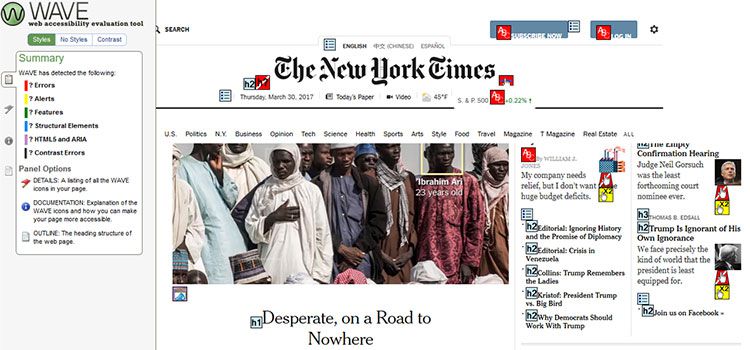
WAVE (Web Accessibility Evaluation Tool) is one of the best known solutions out there. Paste in your site’s URL (or, better yet, use their Chrome or Firefox extensions) and WAVE will load in the page with a sort-of heat map of what’s good and what’s not. It will catch things like missing alt tags, form labels and even point out color contrast issues. You’re then able to click on specific errors and see them highlighted right on the page you’re currently testing.
It’s a tool that really shows you how easy it is to miss certain things. But it’s also good for pointing out deficiencies in third-party plugins and themes.
Once a tool like WAVE has found any issues, you can then go through the process of manually applying fixes. Dolson points out, however, that there can be a bit of an issue with alt text that tools won’t necessarily detect. He says “…an automated tool can only tell whether or not your image has alternative text provided. What it can’t do is determine whether the text is truly an appropriate alternative to the image.”
So, while a tool like WAVE can make your life much easier, you’ll still have to do a little sleuthing to ensure accessibility.
Learn more about Alternative (ALT) Text: https://oregonstate.edu/accessibility/alttext
Are You in Compliance?
Here’s the question that can really cause some confusion for designers and site owners. In fact, even accessibility experts aren’t able to provide an absolute declaration. Dolson explains the challenges:
“The first challenge is identifying what the law actually dictates about the accessibility of your web site. This will vary depending on who pays for your web site, what segment of industry you’re in, and what country your web site is liable in (which is a separate and even more complicated question!). Within the United States, accessibility is governed largely under the Americans with Disabilities Act of 1990, or ADA.
The ADA dictates that places of business should provide equal accommodation for people with disabilities – but, as you can surmise from the date of the act, it doesn’t actually include any information about what would constitute an accessible web site. There are specific guidelines covering US Federal Government web sites described in Section 508 of the Rehabilitation Act of 1998, but that’s a completely separate body of law, and you can’t draw the conclusion that the ADA would or should follow the same guidelines.”
So, it’s complicated to say the very least. In Dolson’s view, following the Web Content Accessibility Guidelines (WGAC) 2.0 will at least give you some sound defense should you be legally challenged.
* As always, be sure to consult a legal professional for advice specific to your situation.
Advice for Testing Your Site
In addition to testing for and fixing errors through an automated tool, it’s also advisable to do some testing on your own. This way, you’ll at least get a sense of what the user experience is like. Among Dolson’s suggestions:
Use a Screen Reader
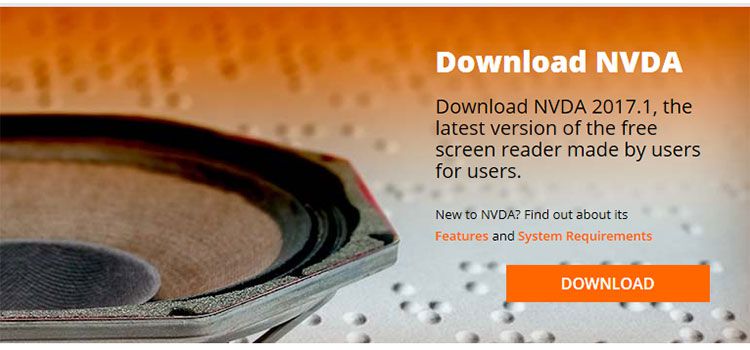
Mac or iOS users can enable the VoiceOver feature. Windows 10 has a built-in Narrator feature. Or, you may want to install a third-party app like NVDA.
Unplug Your Mouse
Try navigating your site using only a keyboard. Here are some tips for enabling keyboard access.
Increase Fonts
Zoom in on your site to make its text 400% and see how it affects layout.
Install Browser Extensions
NoCoffee is a free Chrome extension that will simulate color blindness and other vision problems. RGBlind performs a similar task for Firefox users.
Utilizing these methods is a great way to at least give yourself an idea of how accessible your site is. But they shouldn’t be considered a full-on simulation. Dolson advises that these tools, while valuable, aren’t always an accurate representation. For example, experienced users of a screen reader will probably have a different experience with your site – especially if you’re not familiar with using such software yourself.

Worth the Effort
As we have learned, there is a lot to consider when it comes to accessibility. Thankfully, there are some very useful tools, resources and experts we can lean on to get us going in the right direction.
Ideally, the practices and concepts discussed above should become just another part of your typical site design and build process. That way, it will become second-nature to you – just like HTML or CSS. Slowly but surely, it will help lead us to a more accessible web.
Related Topics
Top