

Topic Archives

Learn WordPress

Various resources for learning about WordPress, including tutorials, articles, and plugins. These resources can help you better understand how to use WordPress, customize your sites, and improve functionality.

View all WordPress articles

How to Hide WordPress Blocks Based on Device

How to Hide WordPress Blocks Based on Device

WordPress 7.0 adds responsive Block Visibility controls for the Block Editor. Learn how to create separate desktop and mobile blocks, hide each one by device, and test the result.

How To Make Your WordPress Website AI-Friendly

How To Make Your WordPress Website AI-Friendly

AI search is changing how people reach websites. This article shows how to make WordPress more AEO friendly with robots.txt, sitemaps, agent readiness checks, Markdown output, and helpful resources.

Best WordPress Staging Site Tools & Resources in 2026

Best WordPress Staging Site Tools & Resources in 2026

A WordPress staging site gives you a safe place to test updates, new plugins, custom code, and AI tools before touching production. Learn hosting, local, and plugin-based options.

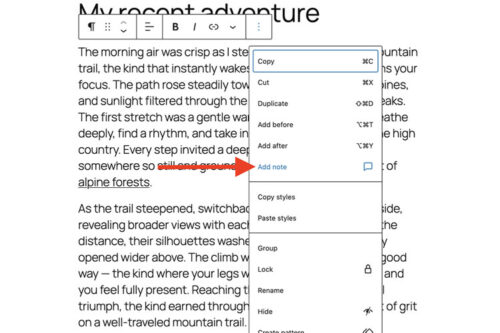
Quick Tip: How To Use WordPress Block Notes

Quick Tip: How To Use WordPress Block Notes

WordPress Notes adds block level comments to the Block Editor. We show you how to add a note to any block, reply in a thread, get email notifications, and mark notes as resolved for smoother collaboration.

A New Choice: Use an Existing Plugin or Vibe Code Your Own?

A New Choice: Use an Existing Plugin or Vibe Code Your Own?

AI makes it easier to build custom WordPress plugins, but it does not make the decision automatic. This article breaks down when to install an existing plugin and when to build your own, based on scope, flexibility, and long-term maintenance.

What Is MCP, and How Can It Help Your WordPress Website?

What Is MCP, and How Can It Help Your WordPress Website?

Model Context Protocol is an open protocol that sits between an AI app and your tools. Learn what it does, how it can connect to WordPress through the MCP Adapter, and what features it can unlock.

How to Update WordPress Themes and Plugins with a ZIP File
How to Update WordPress Themes and Plugins with a ZIP File

We take you through the fairly simple process of updating your WordPress website’s themes and plugins using only a ZIP file.

Using my.WordPress.net to Experiment With AI

Using my.WordPress.net to Experiment With AI

Learn how to use my.WordPress.net as a safe AI sandbox. We show you how to install WordPress in the browser, add the AI Assistant app, connect ChatGPT, Claude, or Ollama, and run a few test prompts.

How to Evaluate the Value of Commercial WordPress Plugins

How to Evaluate the Value of Commercial WordPress Plugins

Not all commercial WordPress plugins are created equal. We’ll help you evaluate whether a commercial plugin is worth the investment.

What to Do When Your WordPress Website Has Been Hacked

What to Do When Your WordPress Website Has Been Hacked

It’s perfectly normal to feel scared or frustrated when your WordPress site has been compromised. Take a breath, and follow this guide for dealing with a hacked WordPress website.

A Guide to Using Commercial WordPress Themes & Plugins

A Guide to Using Commercial WordPress Themes & Plugins

The WordPress ecosystem is chock full of outstanding free software. Why, you could build an entire website using an attractive free theme and a selection of highly-functional plugins. But free…

How to Build a WordPress Maintenance Service

How to Build a WordPress Maintenance Service