
Wireframes… Who Needs Them?

I do, and throughout this post I’ll try to explain why you do too.

So what exactly are wireframes? Wireframes are visual representations of your websites structure, a blueprint to help establish hierarchy. They are usually limited to shapes, forms and text, and they rarely use any colour. The primary function of any wireframe is to show your client how their site will be structured. Pure information, no bells, and no whistles… a blueprint.

When I started designing websites, I didn’t have much of a clue. I did what I thought looked nice, and hoped that one way or another the design would work. If changes came in, then I’d huff and puff and get on with it.

I’d start with a blank canvas and jump straight in, without giving a second thought to what the site should do, how the information would be presented, or even what colour scheme it could use. Believe it or not this went on for a long, long time.

upset after making mistakes
Photo Credit: Gabe

Like anything else, web design is an ongoing process. With each mistake you make, and each project you take on, you learn a little more. I can guarantee that I make mistakes on each new project, but I try not to repeat those mistakes.

It was actually a client who introduced me to wireframes. They presented me with their site, all nicely mapped out. It seemed they knew more than me, but even that wasn’t enough to kickstart me into using wireframes. It wasn’t until I began to account for my project time, that I really began to get to grips with wireframing. My workflow was shoddy. I needed to accomplish more with my time, and therefore make more money.

I think my misconception about wireframing was that it was time consuming. Why bother creating more work? This of course couldn’t be further from the truth. Wireframes will save you time, over and over again. They’ll show your client how their site will be structured, and will also serve as a point of departure for your designs.

Photoshop doesn’t play nice with revisions.
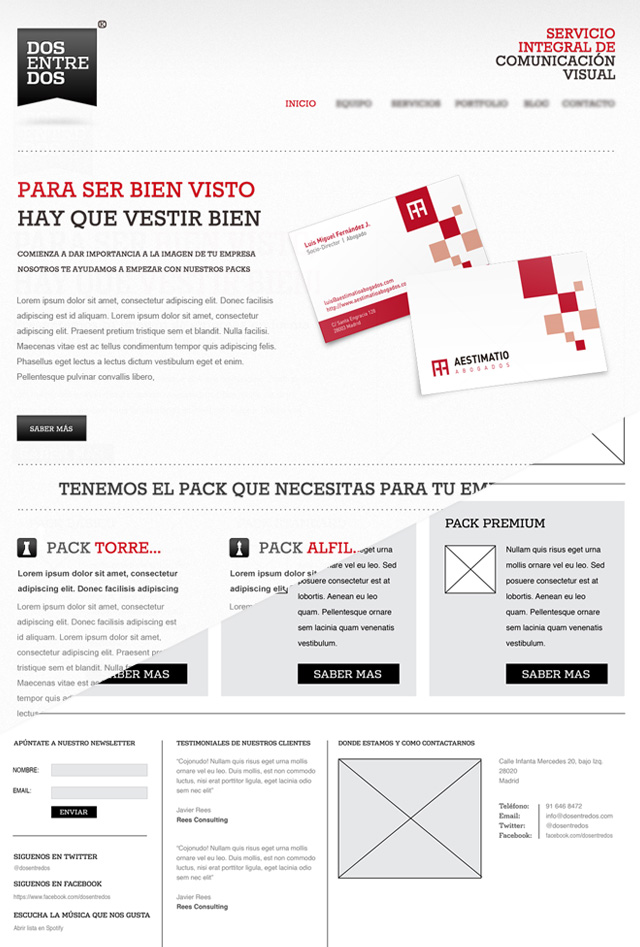
Wirerame overlay with end product

Lets suppose you’re like the old me. You’ve jumped straight into Photoshop and you have a beautiful home page designed. It’s ready to blow your client’s mind. You send it over, with a detailed description of what everything does, why you’ve used the colours you have etc. Bill loves it, the only thing… he’d love to see the side bar on the left instead of the right, and that set of super cool icons that you’ve toiled over all weekend need to go, he feels they just don’t fit in what he had in mind. He wanted something cleaner, less cluttered, different.

You see, there’s the problem, what Bill had in mind. OK, so Bill’s requests don’t suppose such a radical overhaul of the PSD, but imagine you had to make these corrections across the board. You’d have to move every layer, graphic and icon, one by one, file by file. That creates a lot of work, work that extends your project time and reduces your overall income, and that’s not good.

How many ways can you skin a cat?

If you type wireframe software into Google, it throws back 2,420,000 results. That’s a lot of pages to work through. Where do you start?

You can never go wrong with pen and paper. Even if I plan on using software to create my wireframes, I still draw them first. Can’t draw? Neither can I, it really doesn’t matter. All you’re looking for at the moment are ideas. It’s a rough layout, not a work of art.

You’ll be amazed at how many you can churn out in a short space of time. The more the better.

After I have a few down on paper, I begin to merge the best elements and structures of each version to form one SUPER wireframe. When I reach a stage where I’m happy with the initial ideas, then I’ll move over to my mac.

Rough or Smooth?
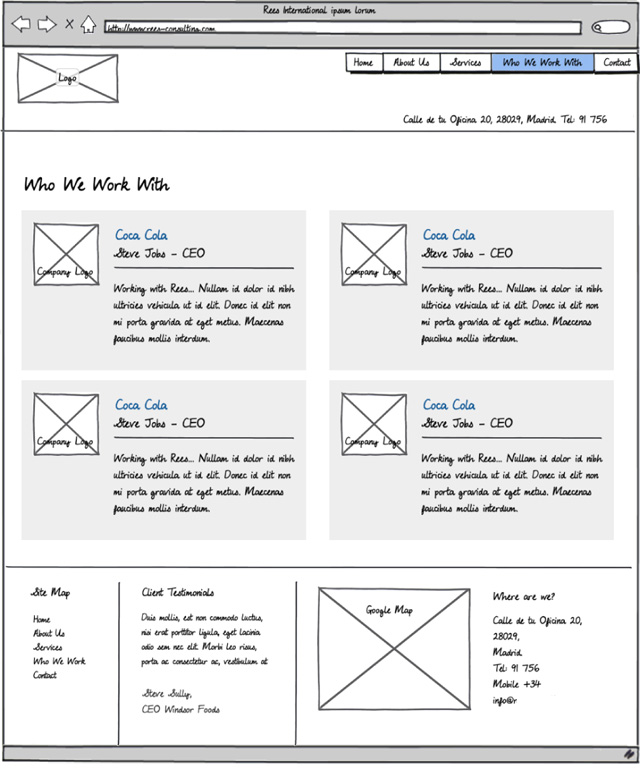
Wireframe created with balsamiq

So what type of wireframe should I build? There are two main types, sketchy and refined. Do you want the outcome to be more informal, almost hand drawn (if not in fact hand drawn) or somewhat more sophisticated, cleaner?

There are those who say that sketchy wireframes give clients the confidence to criticise the layout. They feel that they are looking at something that is in the process of being created. It doesn’t have the appearance of a finished website so they feel less inhibited. After all, we want feedback, right?

The more formal, cleaner look, can give the impression of a more finalised product, this can make it more difficult for some people to speak out.

Regardless of which system you use, there will always be exceptions to the rules, depending on the type of person your client is. My advice is to use whichever you feel comfortable with. Some workaholics even use both! They start out with a rougher, sketchy version and over time, refine it, making the elements cleaner, more precise and closer to a final product.

Throw me a bone!

Here’s a small selection of places to try out your wireframing skills, most have trial versions.

I started off using Balsamiq Mockups. It’s a cracking little program. Its simple to use, intuitive and can get you up and running in no time. There are some downsides, but there always are. I highly recommend their trial version.

Balsamiq Mockups specialises in the creation of sketchy wireframes. It does it well, but after a while I wanted something a little slicker. Being the Scrooge I am, I wanted to create my wireframes using means already at my disposal.
Illustrator! I can hear the gasps… But there’s no automation, there’s no drag and drop, there’s no online access, (dropbox)… No, there’s none of that, but there is complete control. I can reuse my elements once created, and I can work to the pixel if I choose. This isn’t exactly your hand drawn wireframe, the results are stunningly clean. Once you’ve got yourself a little library of elements, you’ll never look back.

But there’s no HTML output… There isn’t with pen and paper either, but it still works. If HTML is something you must have, then you can quickly set up some code and linkup your images. That’s too much like hard work for me. I’m old fashioned, an interactive PDF is good enough for me, and for the majority of my clients.
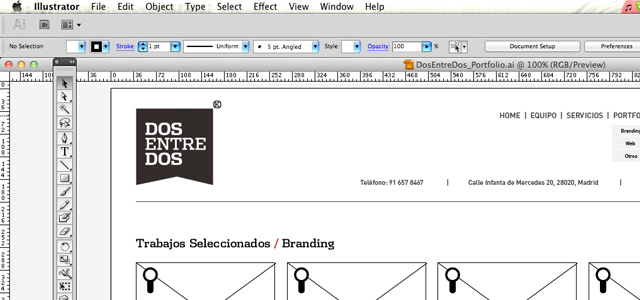
Wireframe created with illustrator

Horses for Courses

No matter which road you choose to go down, you’ll discover that working with wirefames is a great way to help your optimise your workflow. There are no right or wrong ways of doing it, just experiment. As long as you can communicate a visual site structure to your client, a structure that they are willing to sign off on, then your good to go. All the rest comes over time. No doubt in 6 months I’ll be using a different method myself.

Also, let’s not forget, any discussions that may occur later in the project with regards to layout can always be resolved by referring back to the wireframe. Which ever way you look at it, it’s a lifesaver, or at best a time and argument saver.

Next time you get a project in, try it with wireframes. You won’t regret it. You’ll present a professional image to your client, and you’ll be more confident when you actually open up Photoshop. What architect doesn’t present plans before building a house, would you hire one that didn’t?

Pen and paper, software, chalk and blackboard, it’s all the same. Get it down, and get it approved!

Good luck.

You might also like…

10 Completely Free Wireframe and Mockup Applications →
20 Effective Examples of Web and Mobile Wireframe Sketches →
A Collection of Useful Web Design Wireframing Resources →
A Collection of Printable Web Browser Sketching and Wireframe Templates →
15 Javascript Web UI Libraries, Frameworks and Toolkits →
25 UI Inspiration and Design Pattern Resources →
50 Essential Web Typography Tutorials, Tips, Guides and Best Practices →
50 Useful Tools and Generators for Easy CSS Development →
20+ Resources and Tutorials for Creative Forms using CSS →
24 CSS (in some cases with jQuery) Navigation and Menu Tutorials →

Author: (5 Posts)

Nathan Powell works under the moniker of Hand Made Studio in Madrid, Spain. He also runs a small blog aimed at freelance designers called The Freelance Designer. As a web designer who's learned the hard way, he enjoys sharing his experiences on running a freelance business. Follow him at @FreelanceNathan.

  • Oliver

    Very nice read. Might jump from sketching to online wireframes some time !

  • http://www.facebook.com/christian.demiranda Christian de Miranda

    unfortunately there are clients (few) that totally misunderstand the meaning of “sketch”. They think the wireframe is the final product…often I spend more time trying to explain “it is a sketch, a draft, not the final website!” than explain the project itself.

    Nice article!

  • Skyforger

    I use mostly Fireworks for wireframing. Designing some things first in Photoshop then wireframing all together in Fireworks into an interactive pdf file….

  • http://twitter.com/marianaevcs Mariana Andrade

    I always sketch first. 
     Nice read, thank you!

  • Anonymous

    I agree 254%. Maybe more :)

    Unfortunately, most clients – and designer and developers – don’t appreciate the beauty of this part of the process. Everyone wants to jump right in with a solution and the problem hasn’t even been properly defined.  They want to see pretty colors, etc. Why? Because that’s what the last guy/gal did. They wing it – not because they should but because they can. Bad idea.

    Oddly enough, if they were buying a house they’d ask to see a floor plan. FWIW, this is why I try to say “website” less and “iproperty” more. The shift in reference point might not solve the (perception) problem, but it can’t hurt, yes?

    What these non-believers need to realize is that while wireframes do take time in the short-term (and thus add to budget), they typically save far more time in the long run. Tweaking a final design while it’s in dev/beta is usually no party, eh?

    Wireframes are an investment. More importantly, the end product – the iproperty – is much more likely to meet business needs if there is a  “Ok, what exactly are we trying to do here?” step.

    Thanks Nathan. I’m about to forward this link to a couple of colleagues.
     

    • Anonymous

      Its definitely a part that I enjoy too! 

      I hope that some of your colleagues have been able to get some use out of the article.Thanks!

  • Chiara

    I would definitely add Cacoo to the list of software to try, it’s basically brilliant! http://www.cacoo.com

  • Christopher Matthews

    I would suggest that three excellent programs to accomplish drafting a wireframe are Microsoft Visio, Microsoft OneNote, and Autodesk Sketchbook.  Of course OneNote and Sketchbook are more adaptable to having a tabletPC, but can be used with a mouse or a graphics tablet, or a simple touchscreen like the ones found on all-in-one PC’s.  Plus OneNote and Visio have shapes you can use for boxes and buttons and you can add text to them, even hyperlinks.  Come to think of it, so does PowerPoint!

    The benefits to OneNote and Sketchbook also come into play since they are already digitized, so they can be sent via e-mail or put into a web conference with WebEx or TeamViewer and their whiteboard features, so now you can interface with the client remotely.  While the Microsoft programs are available with a trial, your free Hotmail or Live account gets you the Office Web Apps, which includes a scaled down, but effective enough version of OneNote and you can share the files online with SkyDrive (up to 25GB and all free).

    The interactive PDF has merit too since acrobat.com can accommodate some online collaboration.

    When you say you like to use Illustrator, do you then bring your .ai vector file into Photoshop and work it from there or does it require just as much work as building it from scratch in Photoshop?  (I teach all the Adobe CS5 and web design at my school so I like to show how to tie the programs together to create a complete workflow.)

    One last note about Visio is that you can point it to your test site when you finish it and it can generate a site map and include reports on broken links and other errors.

    • Anonymous

      Hi Christopher, 

      You certainly seem to know your stuff! Ill have to take a look into some of your suggestions.

      WIth regards to you’re question… I only use my AI file as a guide to work from in Photoshop. I don’t import anything directly, I think the way I have things set up it would be just as much work.

      At most I could import a copy as a jpeg and use it as a template, but as I work on a 960 grid I don’t really find it essential.

      If you have any suggestions regarding this workflow (or lack of) then Im all ears.

      Cheers

  • http://twitter.com/skyraam SkyRam

    mockflow.com, my Favorite 

  • http://pulse.yahoo.com/_VYW46BFC6ZS564XPTFVI5JMB2E Developers Code

    Nice Nathan..Thanks for sharing..http://www.developerscode.com/

  • http://twitter.com/CySchneider CySchneider

    I tried many tools and had subscriptions of MockFlow and iPlotz. Since several months I’m using Keynote for my Wireframes. I got inspired of http://keynotekungfu.com/

  • Anonymous

    I’m glad to see that I’m not the only one who has become a real fan of wire framing.
    Its only a matter of time before we all realize how much precious time we waste by not using them.

    Cheers guys!

  • Timothy Kywn

    For me nothing beats graph paper, colored pencils, a ruler and a simple shape stencil :)

    • Anonymous

      Nice! Do you present these sketches to your client? or do you move over to your computer afterwards?

    • Jeff Sararas

      My dad was in office furniture sales for 50 years. I was on the phone with him today and was easily able to explain what I was working on (wireframes) by saying “Remember all those mock up drawings you used to do with graph paper and pencils?”.

      Uhh, don’t mean to ‘date’ you Timothy.. ;)
       

  • Todd

    You should share your illustrator elements with everyone.

    • Anonymous

      Hey Todd, thanks for your comment. 

      If you can hang on until the end of the week I’ll upload a copy of what I have. I’ll have to give the document some order…Any preference to your version of Illustrator?CheersNathan

    • Anonymous

      Todd: Here’s the link to my Illustrator wireframe library of elements. Hope there’s something you can use.

      http://goo.gl/jYIzs

      Good luck!

      • Paul Andrew

        Fantastic resource Nathan, I am just going to tweet about them :)

  • Tim

    Ummm, a better thing to do is have a meeting/call with the client go over every aspect of the site BEFORE you start designing it. Ask them what their favorite sites are, what their competition’s sites are, how do they feel about textures vs a clean design, etc etc. How important is SEO (believe it or not some websites don’t rely on it that much and prefer the pay-per-click method to drive traffic). When you are designing a website you are not reinventing anything. Everything you do has already been done somewhere else, whether it’s on the web or even in print.
    In my experience, the client has no concept of visualizing anything less than a complete mockup of the site. You give them a wireframe and they’ll say, “Yeah, ok.” Then you PShop it up and they’ll say, “Well why doesn’t this have this look?”, or something like that. You can completely avoid doing any kind of wireframe if your questions and their answers are what you need to know. You will hit it on the head every time and save yourself a ton of work.

    • Anonymous

      Hi Tim,

      I think there’s too much room for error there, in fact I know there is as its happened to me. 

      I ask my clients to fill out a project planner before I begin any work. This helps me get to the information you mention. 

      So far I haven’t had a client that doesn’t understand what a “blueprint” is, they are happy to sign off on this part of the process, so I can begin the design in earnest. 

      If your method works for you, then good luck!

      Cheers

    • http://www.facebook.com/Future.Tomorrow Steve Joseph

      Hi Tim,

      I’d have to respectfully disagree with the assertion that clients don’t know what a wireframe is but I do realize you said in your experience. Regardless of the agency I’ve been in or with my personal clients, big or small it’s been a notable and consistent practice over the last year or so to show clients wires.

      This wasn’t always the case but something changed late 2009 to present where I and others wouldn’t dream of starting a design or having other aspects of scheduling supersede a review of wires.

      “You can completely avoid doing any kind of wireframe if your questions and their answers are what you need to know.” – If you’re doing a website with 3 pages then you’re probably right and why bother wireframing? However have you ever worked on or built a website with over 37 to 100′s of pages? Not all having the same features carried across or slight changes and subtle differences? For an e-commerce site or one that has user accounts, how do you explain the different features of the user profile and all it’s possibilities by just questions? A shopping cart and checkout system/process without wires?

      Man if you’ve been able to pull this off please share your magic with us. Thanks.

  • http://www.drupal-rocks.com Mori

    For me my wireframe app of choice is still Fireworks CS5, cause I can do the final Design with it also. It has HTML Output, Pages and much more to offer.

    Another tool for sketching and generating a cool click-dummy from it is Axure (http://www.axure.com). It also supports iPhone Behaviours.

    Or Microsoft´s Sketch Flow (http://www.microsoft.com/expression/products/sketchflow_overview.aspx / Free to have if you join the MS Webspark Programme: http://www.microsoft.com/web/websitespark).

  • Mori
  • http://twitter.com/UIreframe UIreframe

    So, maybe you want to try http://uireframe.com
    Nice article by the way.
    Thanks !